
I cannot play audio worth listening to on my Ubuntu box. All I want to do is play music from MP3s, video from YouTube, iTunes content, and so forth. I can play all of these, but the audio crackles as if through extremely blown speakers. Volume level, output hardware (speakers, headphones, front or rear audio jack) makes no difference–it’s all broken.
It turns out that the developers of a nasty little piece of work called PulseAudio are to blame. Oh, they blame everybody else, but the fact is audio works on Ubuntu when you are allowed to use ALSA or OSS, and it does not when you are forced to use PulseAudio. For more on the developers’ crappy attitude toward their willful continued breaking of millions of systems, see my earlier post, Fubuntu.
Here from Wikipedia is the list of “features” that we are supposed to get in exchange for not being able to do the simplest of audio tasks, listen to music. With my responses to each, I quote:
The main PulseAudio features include:
- Per-application volume controls[3]
- I already had this
- An extensible plugin architecture with support for loadable modules
- I want this in my applications, not my infrastructure.
- Compatibility with many popular audio applications[4]
- Not a suitably high bar for TAKING OVER THE AUDIO SYSTEM
- Support for multiple audio sources and sinks
- I already had this with JACK
- Low-latency operation[citation needed] and support for latency measurement
- Worst latency of all the audio servers
- A zero-copy memory architecture for processor resource efficiency
- Sounds great. Let me know when I can use this to play MP3s.
- Ability to discover other computers using PulseAudio on the local network and play sound through their speakers directly
- I do not care about this.
- Ability to change which output device an application plays sound through while the application is playing sound (without the application needing to support this, and indeed without even being aware that this happened)
- I do not care about this.
- A command-line interface with scripting capabilities
- I do not care about this.
- A sound daemon with command line reconfiguration capabilities
- I do not care about this.
- Built-in sample conversion and resampling capabilities
- I have applications for this. Why is the sound server claiming this?
- The ability to combine multiple sound cards into one
- I do not care about this.
- The ability to synchronize multiple playback streams
- I cannot imagine how this is useful outside of an application, and many apps do this just fine. The rest don’t need it.
- Bluetooth audio devices with dynamic detection
- This already happens outside the audio server.
- The ability to enable system wide equalization
- You mean like a bazillion apps already do?
And here’s a bit of explanation:
In a typical installation scenario under Linux, the user configures ALSA to use a virtual device provided by PulseAudio. Thus, applications using ALSA will output sound to PulseAudio, which then uses ALSA itself to access the real sound card. PulseAudio also provides its own native interface to applications that want to support PulseAudio directly, as well as a legacy interface for ESD applications, making it suitable as a drop-in replacement for ESD.
For OSS applications, PulseAudio provides the padsp utility, which replaces device files such as /dev/dsp, tricking the applications into believing that they have exclusive control over the sound card. In reality, their output is rerouted through PulseAudio.
Sound fishy? Here’s why:
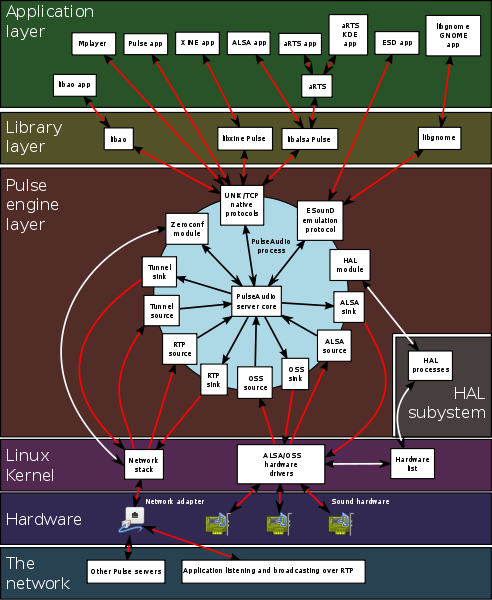
Guess where the problem is.
In this diagram, the things I want to do are on top, the hardware I need to use is on the bottom, and you can see what’s going on there in the middle. What a disaster.
I know I said I was pitching Ubuntu. I’m limping along with it until I get the time and give-a-damn together to evacuate my files and shift to Windows. Meanwhile, I’ve put the MacBook Pro back on the front line.
